8.5.0
The Google Gemini plugin integrates Gemini as a prompt provider in formcycle. Google Gemini is available as a dedicated provider type once the Gemini plugin has been installed.
Contents
Prompt connections
For general information, see the help article prompt connections. The following section describes the configuration specific to Google Gemini.
|
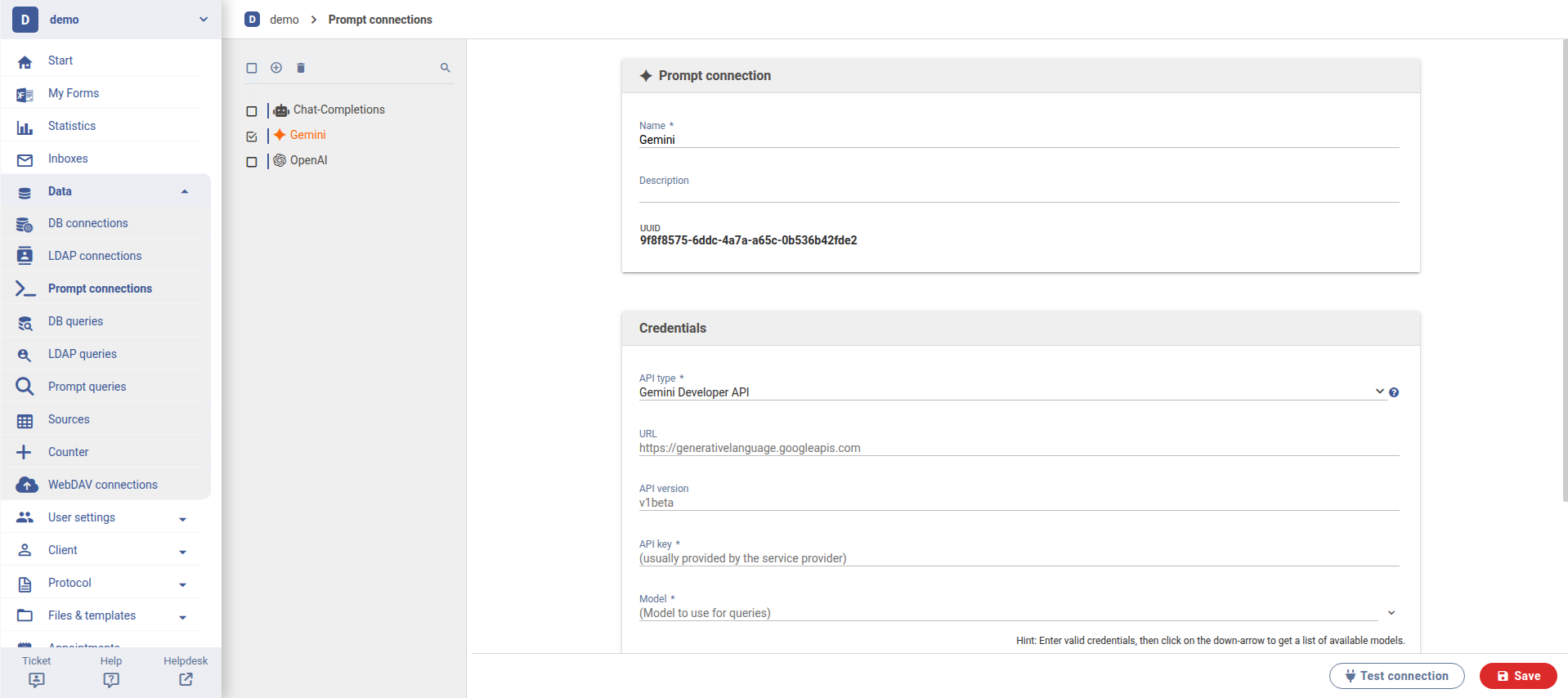
Google Gemini offers two products: the Gemini Developer API and the Vertex AI Gemini API.
The Gemini Developer API is the fastest option to get started. It should be used unless specific enterprise controls are required.
- Simple integration
- Authentication exclusively via API key
- No Google Cloud project configuration required
Vertex AI offers more advanced capabilities and features, but is somewhat more complex to set up.
- Access is not granted via a simple API key
- A credentials file is required
- Additional information such as project ID and location/region must be provided
Vertex AI can also be used in Express mode. This mode is easier to set up and only requires an API key, but it supports fewer features.
- Less configuration effort than the full Vertex AI variant (authentication via API key)
- Still operated through Google Cloud
- Faster path to a production environment
Configuration Fields
- API Type
- Selects the API type through which Gemini should be connected.
- URL
- Base URL used to access the API. Vertex AI Gemini API and Vertex AI Gemini API (Express mode) use the same URL, while the Gemini Developer API has its own separate URL.
- API Version
- The API version determines which features and functions are available and how stable they are.
- v1 = stable
- v1beta = early access (test new features early, but they may still change)
- v1alpha = experimental (highly unstable and intended for testing only)
- Model
- Selects an available Gemini model.
Prompt queries
For general information, see the help article prompt queries. The following section describes the configuration specific to Google Gemini.
Tasks in Gemini
When using the Gemini plugin, different tasks are available. The selected task determines which inputs are supported and in which format the result is returned. Depending on the task, the available configuration sections differ.
|
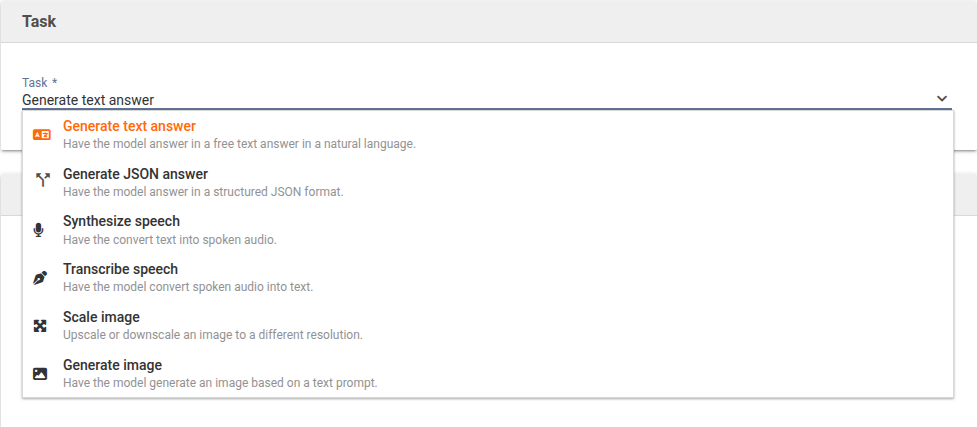
The individual tasks are described separately below.
Task: Generate text answer
The task "Generate text response" produces a free-form response in natural language. It is suitable for all use cases where readable text output is required, such as explanations, summaries, or writing assistance.
Prompt
The Prompt section defines the input the AI receives and how the response should be generated. Web search is available in the Gemini plugin. The model can therefore access current content from the internet.
Files
Files can optionally be included in the prompt request to provide additional information.
Detailed information on configuring the Prompt and Files sections can be found in the help article prompt queries.
Fine-Tuning
Optional settings can be adjusted in this section to control the model's response behavior more precisely. For most use cases, the default values can be retained.
|
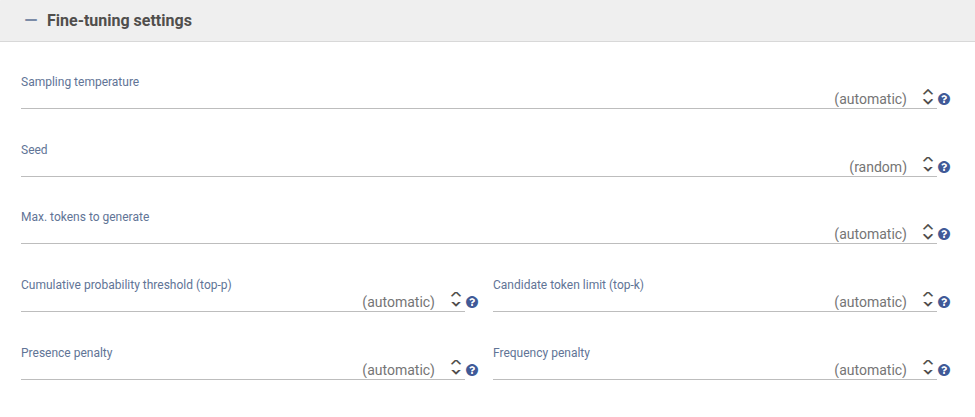
- Sampling temperature
- Influences how creative or restrained responses are phrased. Lower values lead to more factual and stable results, while higher values produce more varied and freer wording.
- Seed
- Defines a fixed starting value for generation. Using the same value can produce a comparable result for the same request. If no value is set, the generation is randomized.
- Maximum tokens to generate
- Determines the maximum length of the response. Once the defined limit is reached, generation stops.
- Cumulative probability threshold (top-p)
- Controls how broadly the model considers possible alternatives when selecting words. Lower values lead to more focused responses, while higher values allow greater linguistic variety.
- Candidate token limit (top-k)
- Limits the number of most likely word options the model can choose from at each step. Lower values make the output more controlled, while higher values allow more variation.
- Presence penalty
- Reduces the likelihood that already used terms will be picked up again. Higher values encourage new content or topics as the response progresses.
- Frequency penalty
- Reduces repetition of individual words or phrases. This can help avoid redundant or repetitive text.
Task: Generate JSON answer
The task "Generate JSON response" produces a structured response in JSON format. It is suitable for use cases where the output needs to be machine-readable and processed further.
All other sections such as Prompt, Files, and Fine-Tuning are also available for this task and are equivalent in structure and function to the "Generate text response" task.
Google Gemini supports only part of the JSON Schema standard. The system attempts to adapt the schema automatically as far as possible so that these limitations are met. Under normal circumstances, this does not require any manual attention. See the Gemini API documentation for details on JSON Schema support.
JSON Schema
The JSON Schema section is additionally available when the "Generate JSON response" task has been selected. This is where the structure in which the model should return its response is defined.
The various options for defining and configuring the JSON schema are described in detail in the help article prompt queries.
Task: Synthesize speech
This task automatically converts input text into spoken speech. An audio file is generated that plays back the text in a natural-sounding voice.
|
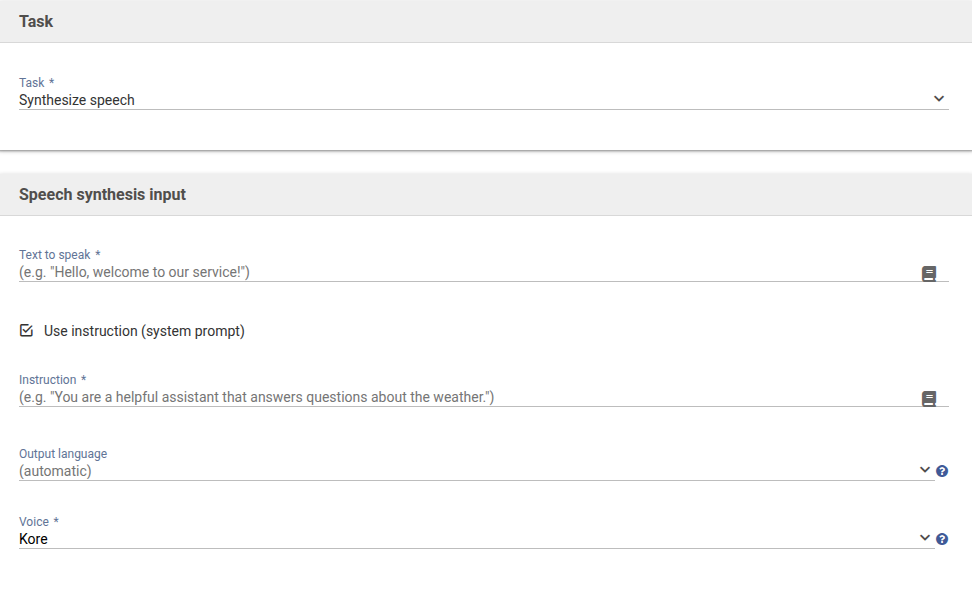
The "Speech synthesis input" section defines which text should be spoken. Optionally, an additional instruction can be provided to influence style, tone, or speaking manner.
The selection fields determine
- which language should be used for the output,
- and which voice should be used.
The result is an audio file that plays back the input text using the selected voice.
Task: Transcribe speech
This task automatically converts spoken language from an audio file into written text. The AI analyzes the audio content and creates a transcript, which is returned in different structures depending on the selected format.
|
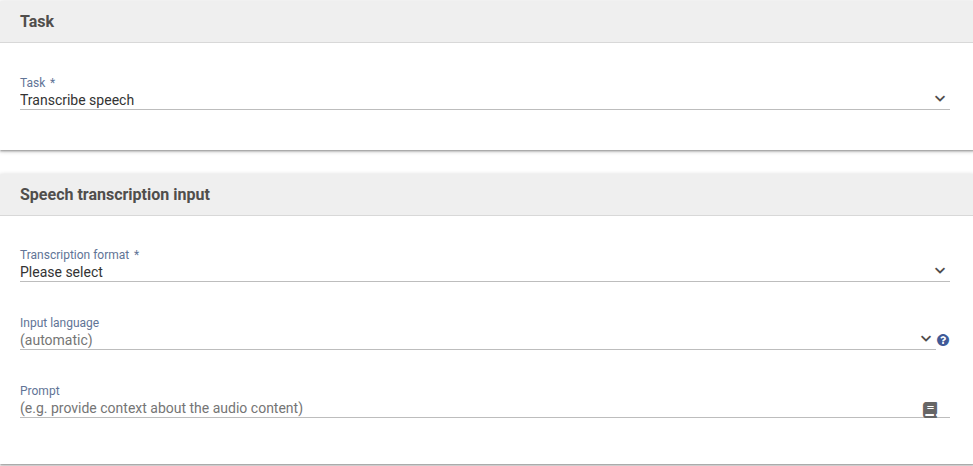
- Transcription format
- This defines the format in which the result is provided.
- Text produces continuous, unformatted plain text.
- Segmented outputs the transcript in individual sections with additional information such as timestamps or speaker assignment.
- The selected format affects how detailed and how suitable for further processing the result is.
- Input language
- The language of the audio file can either be detected automatically or specified manually. Explicitly selecting the language can improve accuracy, especially for short recordings or clearly defined speech.
- Prompt
- Additional context about the audio content can optionally be provided. This can help the system correctly recognize technical terms, names, or thematic relationships.
Task: Scale image
This task resizes an existing image. The image content remains unchanged, but the resolution is increased or reduced. This is useful when an image needs to be adjusted for print, web, or other output formats.
|
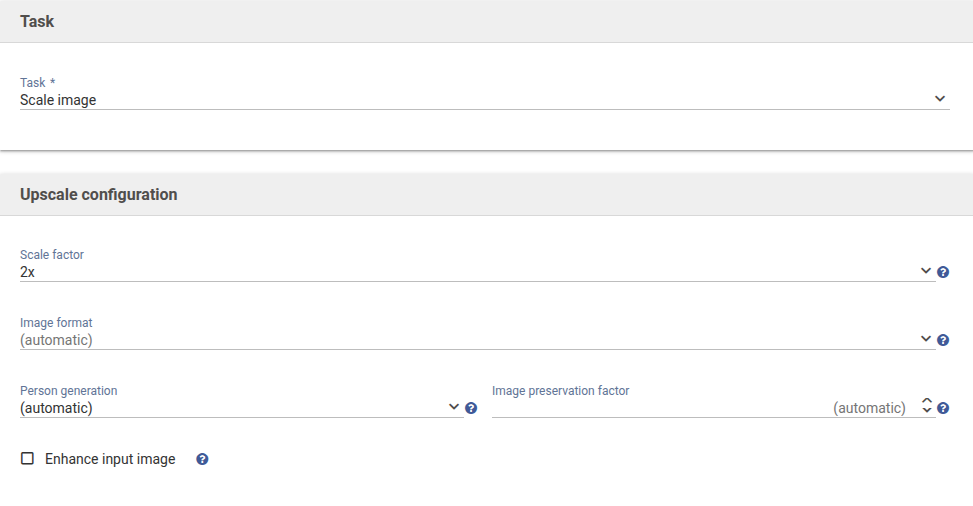
- Scale factor
- Defines the factor by which the image is enlarged or reduced. A higher value increases the resolution accordingly, while a lower value reduces it.
- Image format
- Determines the format of the output file. Depending on the intended use, a suitable format can be selected here.
- Person generation
- Controls whether and in what way people may be included in the image. It can be specified whether people are generally allowed, whether only adults may be shown, or whether people are excluded entirely.
- Image preservation factor
- Influences how strongly the original image is preserved in terms of structure and detail. Higher values keep the result more closely aligned with the source image.
- Enhance input image
- Optionally, the image can also be optimized during scaling, for example through slight quality improvements or detail adjustments.
Task: Generate image
This task creates a new image based on a textual description. The quality of the result depends heavily on how precisely the subject, style, perspective, or mood is described in the input field. The more specific the prompt, the more accurately the image will match the intended outcome.
|
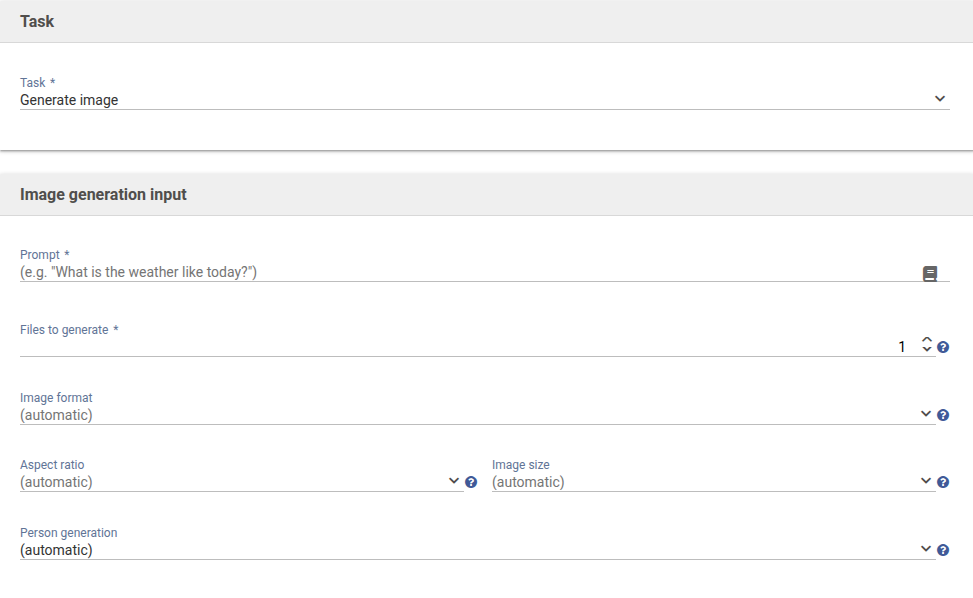
- Prompt
- This is where the content of the image is described. In addition to the subject, details such as environment, lighting, colors, camera perspective, or image style can also be specified.
- Files to generate
- Defines how many image variants are created at the same time. Multiple variants are useful for comparing different interpretations of a description.
- Image format
- Determines the file format of the generated images. The choice can be based on the intended use.
- Aspect ratio
- Defines the ratio of width to height. This influences the image composition and the available space for the subject.
- Image size
- Defines the resolution of the generated image. Higher values produce more detailed results.
- Person generation
- Controls whether people may be included in the image and whether any restrictions apply, such as adults only or no people at all.
Was this article helpful?
That’s Great!
Thank you for your feedback
Sorry! We couldn't be helpful
Thank you for your feedback
Feedback sent
We appreciate your effort and will try to fix the article
