| Actions of the type Import from XML allow to fill form fields with the content of an XML document. To do this, for each form field to be populated, an XPathspecified to an appropriate value in the XML. CONTENTS
|

Parameters
Details for importing form data
- XML source
- Selection of an XML file, which should be used as XML source. Available are form files, client files, files loaded via a URL (external resource), form record attachments or files from previous actions. See actions for a list of supported URL protocols.
- XSL transformation
- Optionally, an XSL template can be specified which transforms the XML document before evaluation.
Values to be set
- Field name
- Name of the form element whose value will be set.
- XPath
- XPath to a value in the XML document whose value is entered into the form field.
Notes on the definition of XPath expressions
- Namespace specifications within element names are not supported.
- If element names with namespace information exist in the XML, the local part of the element name must be accessed in the XPath definition using the XPath function local-name().
- If there are XML element names with special characters (e.g. dot) in the element name, these must be masked separately in the XPath expression so that the special characters are not incorrectly interpreted as XPath syntax information. (e.g. the element name name.with.dot can be used with the syntax
*[local-name()='name.with.dot'] in the XPath expression) - All XPath specifications should be formulated unambiguously so that they return exactly one result when the expression is evaluated. Otherwise, the logic of the workflow action will only ever return the first result, which may not always be the desired value.
The following illustration shows a section of an XML with namespace specifications:
|
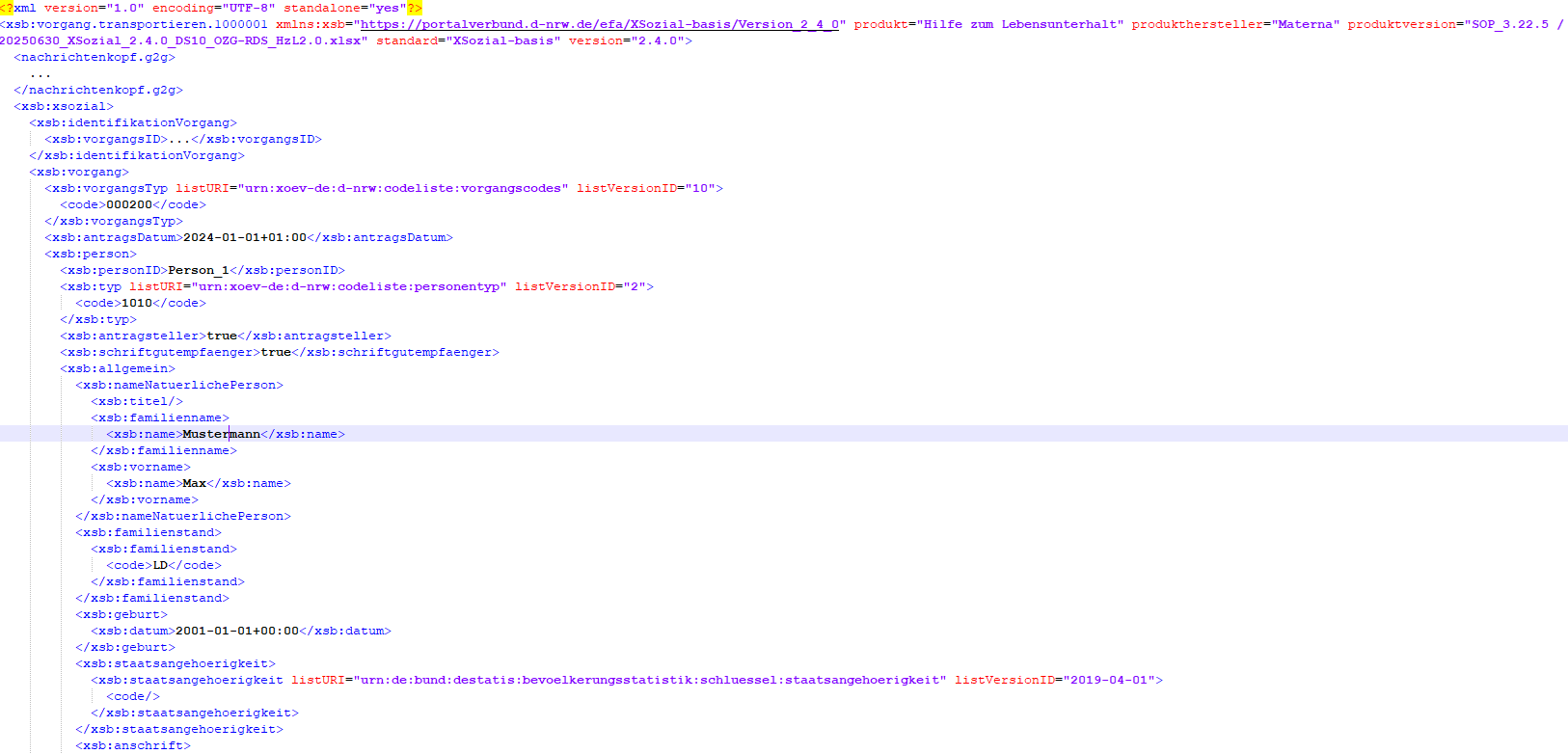
A correct XPath expression for obtaining the family name from the XML example would be:
//*[local-name()='familienname']/*[local-name()='name']/text()
To explain the individual elements of the XPath expression:
- If // is specified, the path (/familienname/name) is searched for relative to the root element
- The local-name() function in the path elements only includes the local name part from the element name for a search. (Instead of the fully qualified element name xsb:familienname, only the local name part familienname is used for the search)
- The text() function returns the content of the element node name
Action variables
Actions of type Import from XML provide Action variables which can be used in subsequent actions.
Standard action variables
- [%$<action name>.SUCCESS%]
- Return whether action was successfully executed. Returns Boolean (true/false).
- [%$<action name>.RESULT%]
- Return all results provided by the action in structured form.
- [%$<action name>.ERROR_CODE%]
- The error code thrown in case of an error in the action. Empty if no error occurred.
- [%$<action name>.ERROR_MESSAGE%]
- The thrown error message in the action's error case. Empty if no error occurred.
Action specific action variables
- [%$<action name>.ERROR.message%]
- Error message returned if the PDF file could not be written to the file system, the specified URL does not match a valid format, no source file could be determined, the file format of the source file is not supported, an error occurs while processing the XML data, or the XSLT transformation was not successful.
Example
For clarification, here is a brief example of how to use XPaths. For example, the XML document looks like this:
<?xml version="1.0" encoding="UTF-8"?>
<xfc-data xfc-version="7.0.0" generation-date="2021-07-27 11:23:43.190 CET">
 <processes>
  <process process-uid="f1e677ad-012d-4586-884b-ac2ee029cb00" creation-date="2021-07-27 11:23:43.0 CET" project-name="XML" status="">
   <form version="1">
    <field name="upl1">
     <plainValue><![CDATA[]]></plainValue>
     <values count="0"/>
     <label><![CDATA[]]></label>
    </field>
    <field name="tf1">
     <plainValue><![CDATA[foobar]]></plainValue>
     <values count="1">
      <value index="0"><![CDATA[foobar]]></value>
     </values>
     <label><![CDATA[]]></label>
    </field>
    <field name="xf-action">
     <plainValue><![CDATA[btnPrev]]></plainValue>
     <values count="1">
      <value index="0"><![CDATA[btnPrev]]></value>
     </values>
     <label><![CDATA[]]></label>
    </field>
   </form>
  </process>
 </processes>
</xfc-data>
To select the value of the field named tf1, the following XPath can be used.
//processes//field[@name="tf1"]/plainValue/text()
Was this article helpful?
That’s Great!
Thank you for your feedback
Sorry! We couldn't be helpful
Thank you for your feedback
Feedback sent
We appreciate your effort and will try to fix the article
