Contents
Server
|
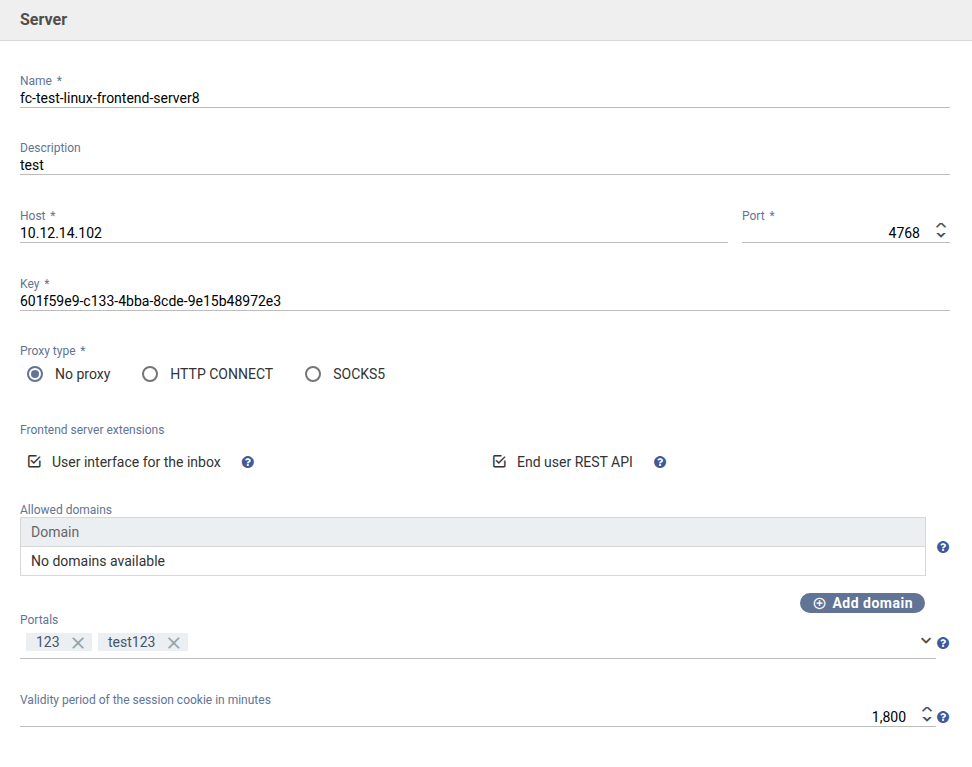
Name
An arbitrary name for the server that will be shown in the connection overview page.
Example: Frontend-Server1
Description
You can enter an optional description for the frontend servers.
Host
The IP address the master server uses to establish a connection to frontend server. FORMCYCLE must be installed on the frontend server.
Examples: localhost, 127.0.0.1
Port
The network port the frontend server listens on for incoming connection from the master server.
Default: 4753
Key
The key of an frontend server is used to check if the master server is authorized to establish a connection to this frontend server. After installing the system for the first time, no such key has been set yet. Once a connection could be established successfully, this key will be transmitted to the frontend server and saved there locally. This process is called impregnation. When another master server attempts to establish a connection to this frontend server, it will require the key that has been set in this option.
This field will be pre-filled with an automatically generated key when creating a new connection.
Example: 65369835-3fc5-45b7-8417-77e24d38db0d
8.3.0 Proxy type
Here it is possible to store your own proxy. HTTP Connect and SOCKS5 can be selected as the type. After selecting a type, a proxy host and proxy host must be specified. Use without a proxy is still possible.
8.2.0 Frontend server extensions
User interface for the inbox: If this is activated, the user interface for the inbox is available on the front-end server.
8.1.0 Enduser REST API: Activates the REST API for end users on this server, which enables the reading of processes, user portals and other data via HTTP requests. This option must be activated in order to publish a user portal on the frontend-server.
8.5.0 Validity period of the session cookie
For the frontend server, the validity period of the session cookie can also be configured. The value is specified in minutes and defines how long a session remains active before an automatic logout occurs.
Connection settings
|
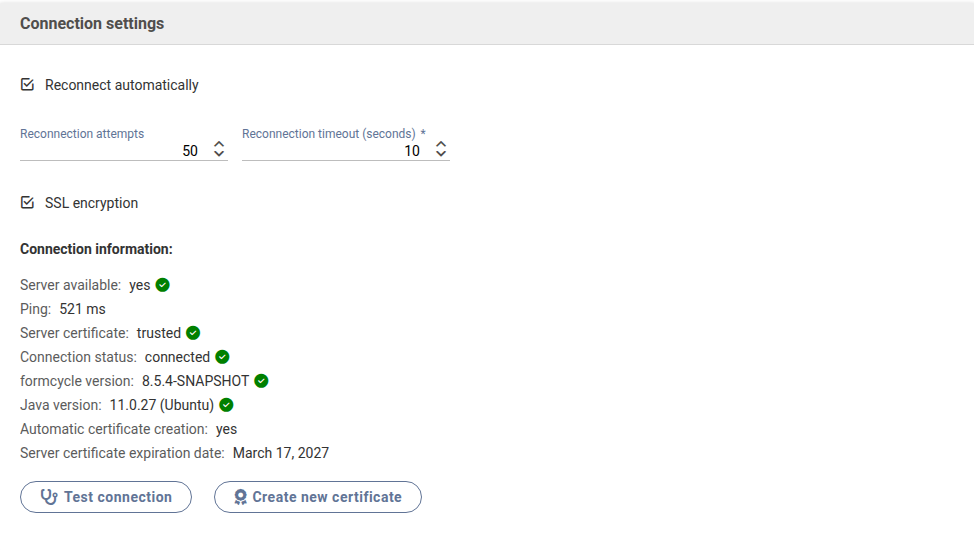
Reconnect automatically
When this option is activated, the master server will attempt to establish a connection to the frontend server automatically when the master server is first started as well as when changing and saving the connection settings.
Reconnection attempts
The number of times the master server should attempt to establish a connection to the frontend server until giving up. When this limit has been reached, no more connection attempts are made the connection keeps the status error.
Default: 50
Reconnection timeout (seconds)
The interval in seconds between two successive connection attempts from the master server to the frontend server.
The total time in seconds the master server attempts to establish a connection is therefore the product of the number of connection attemps and the connection interval.
Default: 10 (every ten seconds)
SSL encryption
The SSL Encryption option allows the connection to the frontend server to be encrypted using the Secure Sockets Layer (SSL).
As of version 8.5.0, encryption is handled via the certificate management. For new installations, a default certificate is created automatically. On the first connection attempt, a trust prompt dialog appears in which the certificate must be confirmed.
Manual Keystore Configuration (prior to version 8.5)
The following options apply only to formcycle versions prior to 8.5. As of version 8.5, SSL encryption is configured via the certificate management.
Show configuration for versions prior to 8.5
|

Path to Certificate Keystore
The Path to Certificate Keystore option specifies the Java keystore containing the certificate used for SSL encryption of the connection to the frontend server. The keystore must contain the certificate that was stored or generated on the frontend server.
Example: C:/FS/.keystore
Password for Certificate Keystore
This field is used to store the password required to open the keystore for SSL encryption.
8.5.0 Certificate Management
Starting with formcycle version 8.5.0, certificates for the frontend server are configured via the certificate management system. You no longer need to enter the keystore path and password in this screen for new configurations.
Additionally, as of this version, connection information is displayed. This provides general information about the connection status, such as server availability connection status, or version information.
If the SSL encryption option is enabled, the following SSL-specific information is additionally displayed in this overview:
- Server certificate
- Automatic certificate creation
- Server certificate expiration date
This information provides details about the currently used certificate and its validity.
8.3.6 Error Pages
The error page configuration is used to replace the default error page (or generic server error messages) with custom error pages. If no specific error pages are configured, the system falls back to a default error page. Absolute URLs are always required.
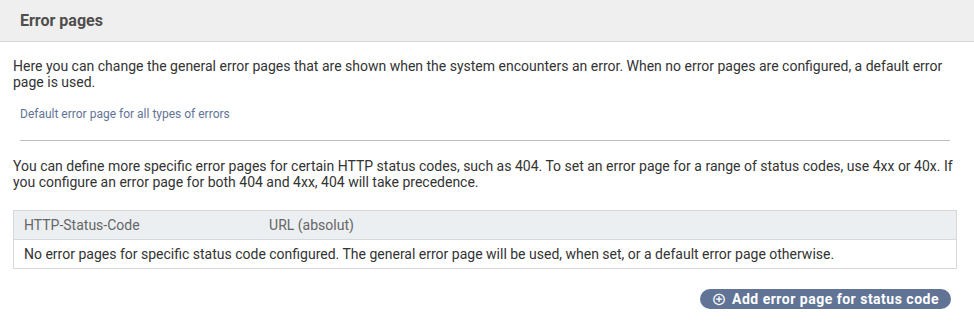
Specific Error Pages for HTTP Status Codes
Error pages can be assigned directly to a single, specific HTTP status code. A common example is HTTP status code 404 (Not Found / Resource not found). To avoid having to configure each possible error individually, formcycle provides the option to define placeholders for entire status code ranges.
- 4xx: Covers all client errors (400 to 499), such as
- 404 (Resource not found)
- 401 (Authorization required)
- 5xx: Covers all server errors (500 to 599)
Error Page Resolution Hierarchy (Precedence)
When multiple definitions apply to the same error code, the system must decide which page to use. The rule is: Specific definitions take precedence over general range definitions.
Was this article helpful?
That’s Great!
Thank you for your feedback
Sorry! We couldn't be helpful
Thank you for your feedback
Feedback sent
We appreciate your effort and will try to fix the article
